Protecting Your Citrix NetScaler Platform Against Password Spraying
TL;DR — Password spraying attacks on Citrix NetScaler/Gateway have massively intensified since late 2023. This article walks through how these attacks evolved by tiers, details the real-world impact I’ve seen at client sites, and provides a complete operational guide with concrete NetScaler configurations to defend against them effectively — including the advanced username rotation detection method from the Citrix Tech Paper.
📋 Table of Contents
Introduction
Password spraying differs from classic brute force in one key way: instead of testing thousands of passwords against a single account, the attacker tests a small set of common passwords (Password123, Summer2024, Qwerty123…) against a large number of accounts, from a large number of IP addresses. The goal: stay below the radar of account lockout and detection mechanisms.
Citrix NetScaler Gateway is a prime target. It exposes an authentication portal directly to the internet, typically tied to the company’s Active Directory. An attacker only needs the portal URL and a list of email addresses — often harvested from LinkedIn or data breaches — to launch a campaign.
A theoretical reminder about password security. It’s field experience: what I’ve seen at client sites, how attacks have evolved, and most importantly, the concrete configurations I’ve deployed in response.
1. How Attacks Evolved: A Tiered Sophistication
Since late 2023, attacks haven’t simply increased in volume — they’ve evolved in successive stages, methodically bypassing each classic defense deployed.
A few hundred IPs, generic user agents (python-requests, curl), spaced out but persistent. Classic defenses work fine here: rate limiting by IP, blacklists, geo-blocking.
Faced with initial defenses, botnets scale up to several thousand IPs. User agents now mimic legitimate browsers. The pace is calibrated: 3 to 5 attempts per IP per hour. Blacklists become ineffective — a blocked IP is replaced within hours.
Geo-blocking falls: attacks now route through « residential proxies » (ISP subscriber IPs in the target country). You can’t block a country without blocking legitimate users.
I deployed blocking for requests that didn’t match the FQDN. I watched the drops roll in for about 30 minutes, stepped away for a coffee. By the time I was back, the attempts had resumed. Maximum coffee break without checking your logs: 30 minutes.
The attack becomes self-adaptive: the pace adjusts dynamically based on server responses, slowing down just enough to bypass dynamic rate limiters.
It’s this last tier that makes purely reactive defenses insufficient. The only stable signature, regardless of attack sophistication, is username rotation from the same IP — which is exactly what section 4 exploits directly.
2. Real-World Consequences
AD account lockouts
The attack causes indirect denial of service: legitimate accounts get locked out simultaneously. Users can’t work, the helpdesk is overwhelmed.
Backend service overload
MFA services are sized for normal usage, not for a flood of lookups against non-existent accounts. Requests open sessions that stay alive until timeout. Everything in the backend takes a hit while NetScaler itself isn’t even breaking a sweat.
Log saturation & SOC fatigue
Thousands of log lines per minute. SIEM alerts explode. SOC analysts spend their time sorting noise instead of detecting real threats.
Account compromise
Accounts with weak passwords — and unfortunately there are always some — get compromised. The attacker gains access to VDI or internal applications published via the Gateway.
Availability impact
Authentication request overload can degrade Gateway vserver performance. Legitimate users experience slowdowns or timeouts.
3. Core Configuration Best Practices
AAA Parameters
The first line of defense: properly configuring global authentication parameters. The first command is critical — it forces attackers into a username rotation loop, or to wait out the lockout window. Tune the values according to your requirements: login X won’t be processed by NetScaler for 300 seconds after 3 failed attempts.
# Limit login attempts and set the lockout timeout
set aaa parameter -maxLoginAttempts 3 -failedLoginTimeout 300 -defaultAuthType LDAP
Multi-Factor Authentication (MFA)
MFA is the single most effective measure against password spraying. Even if a password is compromised, the attacker is stopped at the second factor. It’s a must-have on any internet-facing platform — no excuses.
Monitoring and Logs
No visibility, no detection. Configure your logs to capture all authentication attempts and forward them to your SIEM:
# Enable detailed authentication logging
set audit syslogParams -logLevel ALL
set audit nslogParams -logLevel ALL

# Send logs to an external SIEM
add audit syslogAction siem_action X.X.X.X -logLevel ALL -logFacility LOCAL0 -transport TCP
add audit syslogPolicy siem_policy "ns_true" siem_action
bind system global siem_policy -priority 100
NetScaler Console (ADM / MAS)
ADM, MAS, Citrix NetScaler Insight, NetScaler Console… as many names as there are bot IPs — thanks Citrix. Whatever you call it — plug it in. It gives you dedicated logs, easy exports, and all the management capabilities for your NetScaler fleet.
4. Advanced Implementation: Username Rotation Detection
This method goes beyond simple IP-based rate limiting. It comes directly from the Citrix Tech Paper dedicated to detecting password spraying on NetScaler Gateway — and it’s what I implement at my clients.
💡 Detection Principle
- Same username from a given IP
- Zero or very low username rotation
- Predictable behaviour
- Different usernames from the same IP
- High and systematic rotation
- Recognisable pattern
The solution uses two NS variables stored in memory:
| Variable | Role | Expiry |
|---|---|---|
Likelihood_Bad_IP_Counter |
Username rotation counter per IP | 24h |
Username_And_IP_Uniqueness_Checker |
Last username attempted from each IP | 24h |
When an IP exceeds 9 username changes, it’s automatically blocked by a Responder policy, before even reaching the LDAP backend. Active Directory accounts are never queried for malicious IPs — eliminating the risk of mass lockout and authentication backend saturation.
NS Variables
# Username rotation counter per IP (expires after 24h)
add ns variable Likelihood_Bad_IP_Counter \
  -type "map(text(128), ulong, 10000)" -expires 86400

# Last username storage per IP
add ns variable Username_And_IP_Uniqueness_Checker \
  -type "map(text(128),text(256),10000)" -expires 86400
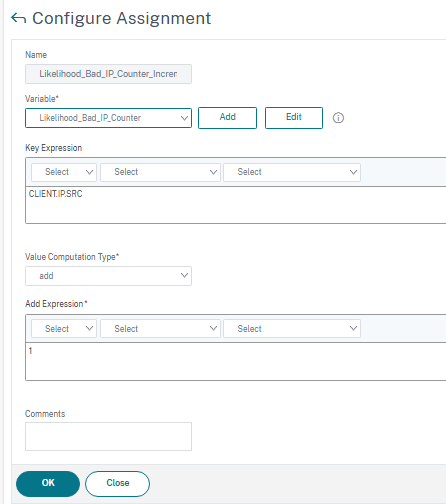
Assignments
# Increment counter when username changes
add ns assignment Likelihood_Bad_IP_Counter_Incrementer \
  -variable "$Likelihood_Bad_IP_Counter[CLIENT.IP.SRC]" -add 1

# Store the current username
add ns assignment Username_And_IP_Uniqueness_Checker_Addition \
  -variable "$Username_And_IP_Uniqueness_Checker[CLIENT.IP.SRC.TYPECAST_TEXT_T]" \
  -set "HTTP.REQ.BODY(1000).TYPECAST_NVLIST_T('=','&').VALUE(\"login\")"
Authentication Policies
# Detect username change and increment the counter
add authentication Policy Increase_Likelihood_Bad_IP_Pol \
  -rule "($Username_And_IP_Uniqueness_Checker[client.ip.src.typecast_text_t] != \
HTTP.REQ.BODY(1000).TYPECAST_NVLIST_T('=','&').VALUE(\"login\")) && \
HTTP.REQ.BODY(1000).TYPECAST_NVLIST_T('=','&').VALUE(\"login\") != \"\"" \
  -action Likelihood_Bad_IP_Counter_Incrementer

bind authentication vserver Gateway_Auth_vServer \
  -policy Increase_Likelihood_Bad_IP_Pol \
  -priority 110 -gotoPriorityExpression NEXT

# Update the stored username
add authentication Policy Username_And_IP_Uniqueness_Checker_Pol \
  -rule true \
  -action Username_And_IP_Uniqueness_Checker_Addition

bind authentication vserver Gateway_Auth_vServer \
  -policy Username_And_IP_Uniqueness_Checker_Pol \
-priority 120 -gotoPriorityExpression ENDWhitelist and Blocking Policy
# Dataset for always-allowed IPs (internal proxies, NAT)
add policy dataset Proxy_Server_And_NAT_IP_That_Bypass_Password_Spray_Detection ipv4

# Block IPs that exceed the threshold (9 username changes)
add responder policy Drop_Pol \
  "($Likelihood_Bad_IP_Counter[CLIENT.IP.SRC.typecast_text_t].GE(9) && \
client.ip.src.typecast_text_t.equals_any(\"Proxy_Server_And_NAT_IP_That_Bypass_Password_Spray_Detection\").NOT) \
&& (HTTP.REQ.URL.PATH.EQ(\"/logon/LogonPoint/ip_status\").NOT && \
HTTP.REQ.URL.PATH.EQ(\"/logon/LogonPoint/ip_status_reset_counter\").NOT)" DROP

bind vpn vserver Gateway_vServer -policy Drop_Pol \
  -priority 10 -gotoPriorityExpression END \
-type REQUEST -type AAA_REQUESTCounter Reset After Successful Authentication
# Reset counter after successful login
add ns assignment Likelihood_Bad_IP_Counter_Reset \
  -variable "$Likelihood_Bad_IP_Counter[CLIENT.IP.SRC]" -clear

add authentication Policy Increase_Likelihood_Counter_Reset_Pol \
  -rule true -action Likelihood_Bad_IP_Counter_Reset

add authentication policylabel Likelihood_Bad_IP_Counter_Reset_Policy_Label \
  -loginSchema LSCHEMA_INT

bind authentication policylabel Likelihood_Bad_IP_Counter_Reset_Policy_Label \
  -policyName Increase_Likelihood_Counter_Reset_Pol \
  -priority 100 -gotoPriorityExpression NEXT

add authentication Policy Return_Success -rule true -action NO_AUTHN
bind authentication policylabel Likelihood_Bad_IP_Counter_Reset_Policy_Label \
  -policyName Return_Success -priority 110 -gotoPriorityExpression NEXT

# Bind reset after the LDAP policy
bind authentication vserver Gateway_Auth_vServer \
  -policy Gateway_LDAP_Policy -priority 100 \
  -nextFactor Likelihood_Bad_IP_Counter_Reset_Policy_Label \
-gotoPriorityExpression NEXTOperator Status Page
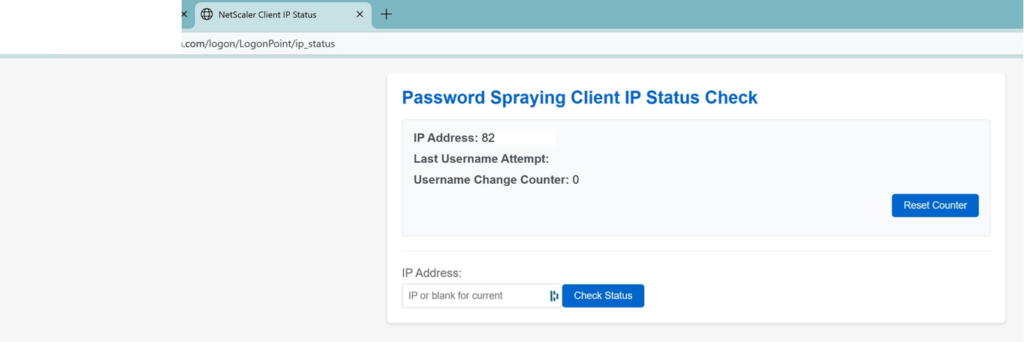
Accessible at /logon/LogonPoint/ip_status — only for IPs in the IP_Status_Page_Allowed_Clients dataset. It lets you check an IP’s counter and reset it without touching the NetScaler configuration — useful when dealing with a false positive on a legitimate user.
# Allow IPs to access the status page
add policy dataset IP_Status_Page_Allowed_Clients ipv4
bind policy dataset IP_Status_Page_Allowed_Clients X.X.X.0/24

# Access policies for status page and counter reset
add responder policy IP_Status_Page_Resp_Pol \
  "HTTP.REQ.URL.PATH.EQ(\"/logon/LogonPoint/ip_status\") && \
client.ip.src.typecast_text_t.equals_any(\"IP_Status_Page_Allowed_Clients\")" \
  IP_Status_Page_Act

add responder policy IP_Status_Page_Resp_Pol2 \
  "HTTP.REQ.URL.PATH.EQ(\"/logon/LogonPoint/ip_status_reset_counter\") && \
client.ip.src.typecast_text_t.equals_any(\"IP_Status_Page_Allowed_Clients\")" \
  Likelihood_Bad_IP_Counter_Reset_Request

add responder policy IP_Status_Page_Resp_Pol3 \
  "HTTP.REQ.URL.PATH.EQ(\"/logon/LogonPoint/ip_status_reset_counter\") && \
client.ip.src.typecast_text_t.equals_any(\"IP_Status_Page_Allowed_Clients\")" \
  IP_Status_Reset_Counter_Act

# Bind on the Gateway vserver
bind vpn vserver Gateway_vServer \
  -policy IP_Status_Page_Resp_Pol -priority 100 \
  -gotoPriorityExpression END -type REQUEST

bind vpn vserver Gateway_vServer \
  -policy IP_Status_Page_Resp_Pol2 -priority 110 \
  -gotoPriorityExpression NEXT -type REQUEST

bind vpn vserver Gateway_vServer \
  -policy IP_Status_Page_Resp_Pol3 -priority 120 \
-gotoPriorityExpression END -type REQUESTReplace Gateway_Auth_vServer and Gateway_vServer with your actual vserver names. Adjust the threshold (.GE(9)) according to your use case. Add your internal proxy/NAT IPs to the Proxy_Server_And_NAT_IP_That_Bypass_Password_Spray_Detection dataset — to avoid accidentally locking out your headquarters every Friday afternoon due to a mild case of collective typing tremors.
5. Verification and Results
The status page is up and running!
Only accessible if your IP has been correctly added to the IP_Status_Page_Allowed_Clients dataset:
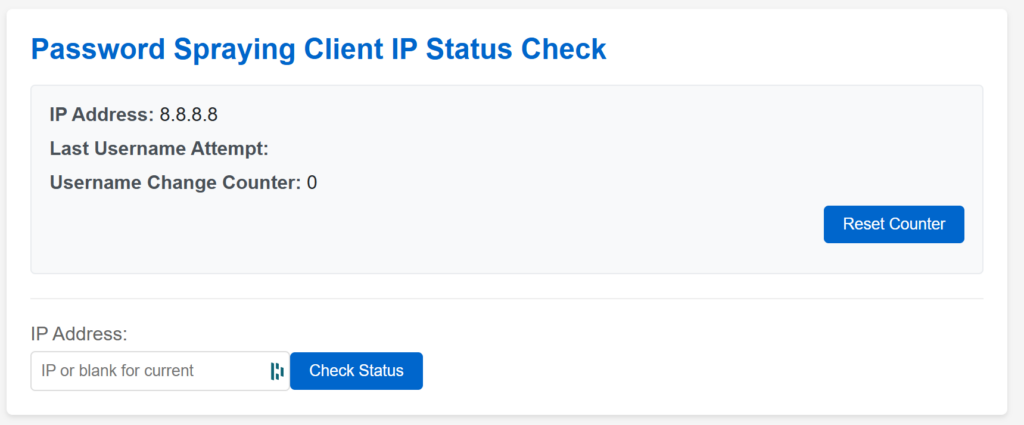
Counters are incrementing!


If you’re testing this: with the DROP policy sitting at the top of the Responder chain, refreshing your Gateway won’t even show you the login page anymore — just a blank timeout. Effective.
6. Conclusion
Password spraying isn’t a flashy attack. It’s patient, distributed, and increasingly sophisticated. Its strength lies in its discretion: it flies under the radar of classic defenses.
Protecting a NetScaler/Gateway platform requires a layered approach:
✅ Protection checklist
None of these measures is sufficient on its own. It’s the combination that makes the difference.
7. Annexes
📚 References
- Citrix CTX579459 — Advisory on mass authentication attempts
- CVE-2023-4966 (Citrix Bleed) — https://nvd.nist.gov/vuln/detail/CVE-2023-4966
- Detecting and Mitigating Password Spraying Attacks on NetScaler Gateway — Citrix Tech Papers
- Password spraying attacks on NetScaler/NetScaler Gateway – December 2024 – Citrix Blogs
🛠️ Recommended Tools
- Citrix ADM / NetScaler Console — monitoring, analytics, centralised management
- SIEM (Splunk, ELK, QRadar) — log correlation and detection
For those following the naming saga: NetScaler, Citrix ADC, Citrix Gateway, NetScaler Console, NetScaler MAS, Command Center, Insight Center… If I’ve missed any, let me know. The Cloud Software Group marketing department deserves a dedicated article.